HTTPS Redirection
Overview
The image shows the HTTPS Redirection setting, which is used to enforce secure communication by automatically redirecting all HTTP requests to HTTPS.
Configuration Details
- httpsRedirection (Value: True): This option indicates that HTTPS redirection is currently enabled. When set to True, all incoming HTTP traffic is redirected to HTTPS.
- Dropdown Selector: Allows the user to toggle the setting between True (enabled) and False (disabled), depending on security requirements.
- Update Button: Applies and saves the selected configuration. Changes take effect after clicking this button.
Functionality
When enabled, any request made over HTTP is automatically redirected to its HTTPS equivalent, ensuring that all communication between the client and server is encrypted.
Use Cases
- Enforcing secure communication across web applications
- Protecting sensitive user data from interception
- Meeting security compliance requirements
Recommendation
It is strongly recommended to keep HTTPS Redirection enabled (True) in production environments to ensure data security and prevent vulnerabilities associated with unencrypted traffic.
How to Enable HTTPS Redirection
- Navigate to TCP Config.
Click on TCP Config from the left navigation menu.

- Locate the required Frontend server from the list you want to enable HTTPS Redirection.
- In the frontend server configuration panel, locate the HTTPS Redirection option.
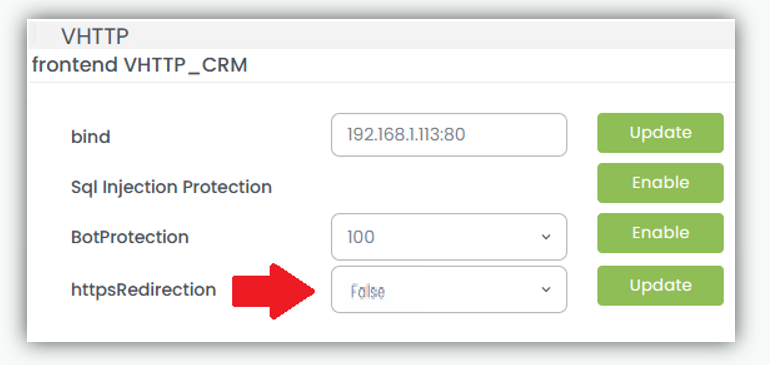
- Change the value to True from the drop down list.

- Click Update to save the configuration.
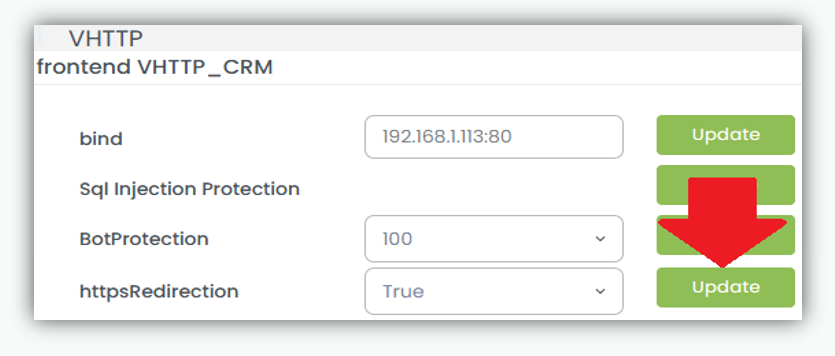
Once enabled, all incoming HTTP traffic to the selected frontend server is automatically redirected to HTTPS.